Use File - Close All to close all existing
source windows, then
create a new Java Project named Lab03.
In the Package Explorer, right-click on the new project
and choose New - Package. Name the package
part0.
Right-click on the part0 package and create a new
class named CalcCircleArea -- the class should have
a main method.
The CalcCircleArea program should calculate the area of
a circle using the formula:
area = Math.PI * radius * radius
To get started, in main, define a variable to hold
the radius and initialize it:
double radius = 32.5;
Using the above equation, initialize a new double variable, area
to calculate the area given the radius variable:
double area = . . .
Print the area to the console:
System.out.println("Area: " + area);
To run the program, in the Package Explorer, right-click on
the CalcCircleArea.java entry and choose Run As -
Java Application. The result should be 3318.3072403542187.
Part 1: Math Operators
Steps:
In the Package Explorer, right-click on the Lab03 project
and choose New - Package. Name the package
part1.
Right-click on the part1 package and create a new
class named TestQuadratic -- the class should have
a main method.
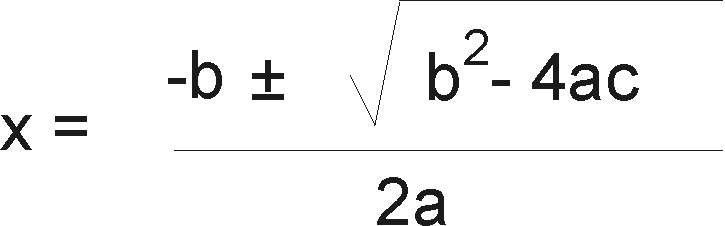
In this part, you will write two methods that solve
the quadratic equation (a.k.a. the quadratic formula).
As you may recall from
school, the quadratic equation solves equations of
the form:
Using this formula:
The quadratic formula returns two results (note the +-), so
you will write two methods. Add the following two methods
above main, but inside of the class:
public static double solveQuadraticPlus (double a, double b, double c)
{
    return 0;
}

public static double solveQuadraticMinus (double a, double b, double c)
{
    return 0;
}
Using math operators and methods from the Math class,
complete the solveQuadraticPlus method so it
returns the result using the '+' case.
Note: Java defines the - operator that
flips the sign of a numeric variable (e.g. a double).
Hint: You can implement the equation using multiple
lines of code. For example, you can calculate the value
of the expression inside of the square-root radical using
code like (put this code in solveQuadraticPlus):
double inner = b * b - 4 * a * c;
Then you could calculate the square root:
double radical = Math.sqrt(inner);
Use similar steps to complete the equation.
Another hint: A method sends a result back to its
caller using the return keyword. Each
of your methods should return a double value back
to the caller:
return xxxx; // xxxx is the name of your 'result' variable
Complete the solveQuadraticMinus method so it returns
the result using the '-' case.
In main, call the two methods and print the results.
for example:
For testing, if you use a=1, b=3, c=-4 (note the
minus sign),
the answers should be 1.0 and -4.0.
Part 2: More on Math Operators
In this part, you will learn more about math operators
and related topics.
Steps:
Create a new class named MoreMath in the part2
package. The new class should have a main method.
In main, write the following code that loops
100 times (we will cover loops in detail later):
for (int i=0; i<100; i = i + 1)
{
}
This loop uses the variable named i to count from
zero to 99.
Inside of the loop, use an if statement so that
the program prints only values of i that are
multiples of seven. Hint: use the
remainder '%' and equality '==' operators.
Run and test.
Above main, but within the class, write a new
method that calculates Ohm's Law:
public static int calcCurrent (int volts, int resistance)
{
    return volts/resistance;
}
Note that for now, we use int for the types.
In main, after the loop, call the calcCurrent
method, passing volts=5 and resistance=0.
Run the program. What happens and why?
Convert the calcCurrent method to use doubles
instead of int.
Run again. What does this tell you about how Java treats
floating-point and integer arithmetic?
Part 3: More Operators
In this part, you will practice with compound assignment
operators.
Steps:
Create a new class named ScorePrediction in the part3
package. The new class should have a main method.
In the new class, above main, define a method:
public static int calcBonus ( int predictedTeam1,
                              int predictedTeam2,
                              int actualTeam1,
                              int actualTeam2 )
{
    return 0;
}
Your program will implement part of a scoring system
for a sports "pool" in which participants predict
the output of a game between two teams. The
calcBonus method
accepts a participant's predicted scores for each
team and the actual results of the game.
Your job is to complete this method so it returns
a "bonus" value based on how accurate the prediction
was. Here are the rules for calculating the bonus:
If the participant predicted the actual score for
either team, award 3 points for each correctly
predicted score (6 points maximum)
If the participant correctly predicted the absolute
value of the margin
between the winning and losing teams, award 5 points
If the participant predicted the correct winning
team, award 10 points
Here is a snippet of code to help you get started
(it implements part of the first bullet point):
public static int calcBonus ( int predictedTeam1,
                              int predictedTeam2,
                              int actualTeam1,
                              int actualTeam2 )
{
    int score = 0;

    if (predictedTeam1 == actualTeam1)
        score += 3;

    return score;
}
Here are some hints:
There can be no tie games
The Math class contains a method that
calculates absolute value
You can construct boolean expressions to help
you work with determining the winning team:
In this part, you will practice the techniques covered
in this lab to reinforce the concepts.
Steps:
Create a new class named CompoundInterest
in the part4 package. The class should
have a main method.
In this class, you will write a method that calculates
the future value of an investment that accumulates
compounded interest. The formula is:
P = Future value
C = Initial deposit
r = Interest rate expressed as a fraction (e.g. 0.05)
n = Number of times interest is compounded each year
t = Number of years
Write a static method named calcCompoundInterest that
accepts the four input arguments as doubles
and returns a double result containing the
future value.
Call the method from main and print the result
to the console.
Here is an example you can use for testing:
Paul invested $10,000 at an
interest rate of 7.5% compounded quarterly.
How much money would he have after five years?
The correct answer is $14,499.48 (rounded to two decimal
places).