In this lab, you will work with arrays and collections.
Create a new Java project named Lab08.
In the project, create a new class named Game in the pool package. This class doesn't need a main method.
Complete the class to the following specifications:
Right-click on the project and choose New - File to create a file named games.txt.
Enter the following into the file:
2014-10-23
Iowa
Nebraska
2014-10-30
Michigan
Ohio State
2014-11-7
Penn State
Maryland
This file cotains data for three games, each game taking up three lines of text.
Note: Ensure that there are no blank lines at the beginning or end of the file.
Create a class named TestArrays in the part1 package. This class should have a main method.
Complete main according to the following specifications:
Scanner scanner = new Scanner(new FileReader("games.txt"));
String date = scanner.nextLine();
String team1Name = scanner.nextLine();
String team2name = scanner.nextLine();
Run your program. Do you see the correct console output for the games data you entered into games.txt?
Modify games.txt, adding three lines for data for another game. Then change the program's loop(s) so they go through four times. Run the program again. What happens? How could you fix this? Remember that you cannot change the size of an array once it's allocated!
In this part, you will convert your program from the previous part to use an ArrayList collection rather than a simple array. The primary benefit of this is that you don't need to know in advance how many entries will go into the collection.
Create a new package named part2 and copy the TestArrays class into the new package. Then right-click on the copied class and choose Refactor - Rename and change the name to TestArrayList.
Modify the class so that it uses an ArrayList collection instead of the array. Here are some hints:
Test your program -- it should work! Add data for another game or two to games.txt and test again.
In this part, you will use a HashMap collection to store unique words parsed from a String.
Create a new class named WordCount in the part3 package. The class should have a main method.
In main, create a HashMap instance named words.
Prompt the user and retrieve a String using a Scanner connected to System.in.
To parse the String, you can use the java.util.StringTokenizer class. Please read the JavaDoc and ensure that you understand the basics of how it works.
Use a StringTokenizer to parse the String and loop through the words (assuming you named your String inputString):
StringTokenizer st = new StringTokenizer(inputString);
while (st.hasMoreTokens())
{
    String word = st.nextToken();

}
The goal of this part of lab is keep track of each unique word and how many times the word occurs in the input string. To do this, you will use each word as the key in the HashMap -- HashMaps guarantee key uniqueness.
For the value associated with the key, we would like to store an integer count of how often the word appears. However, HashMaps require that the value be an Object, not a primitive, so we can't use int!
This is a perfect example of when the so-called "wrapper" classes come in handy. You will use objects of the java.lang.Integer class as the value -- remember that Integer objects internally store an int and provides a method to retrieve the int.
So inside of the tokenizer loop (after the call to nextToken), write the following to retrieve the Integer associated with the current word, creating a new Integer object if it's a new word (i.e. not already in the HashMap):
Integer countObj = (Integer)words.get(word);
if ( countObj == null )
    countObj = new Integer(1);
Note that if the word isn't in the HashMap, we create a new Integer object with a count of one.
Add an else to the if statement for the case that the word's already in the collection:
else
{
    int count = countObj.intValue();
    count++;
    countObj = new Integer (count);
}
If the word already exists in the HashMap, we retrieve its Integer object, increment the count and create a new Integer with the updated count.
We can now store either the new or updated Integer as the value, using the word as the key:
words.put(word, countObj);
The entire loop should look like:
StringTokenizer st = new StringTokenizer(inputString);
while (st.hasMoreTokens())
{
    String word = st.nextToken();

    Integer countObj = (Integer)words.get(word);
    if ( countObj == null )
        countObj = new Integer(1);
    else
    {
        int count = countObj.intValue();
        count++;
        countObj = new Integer (count);
    }

    words.put(word, countObj);
}
Next, you can retrieve the Set of keys from the HashMap and iterate the Set, each time displaying the key (i.e. the word) and its associated value (i.e. the Integer).
Use the HashMap example in the course notes as inspiration.
Run your program, entering the following String (on a single line):
Now is the time for all good men to come to the aid of their
country for the cause of freedom
Did your program display the correct word counts?
In many scenarios, especially in math-heavy applications, it's useful to work with multi-dimensional arrays. While Java doesn't directly support multi-dimensional arrays, we can get a close approximation using arrays that contain other arrays.
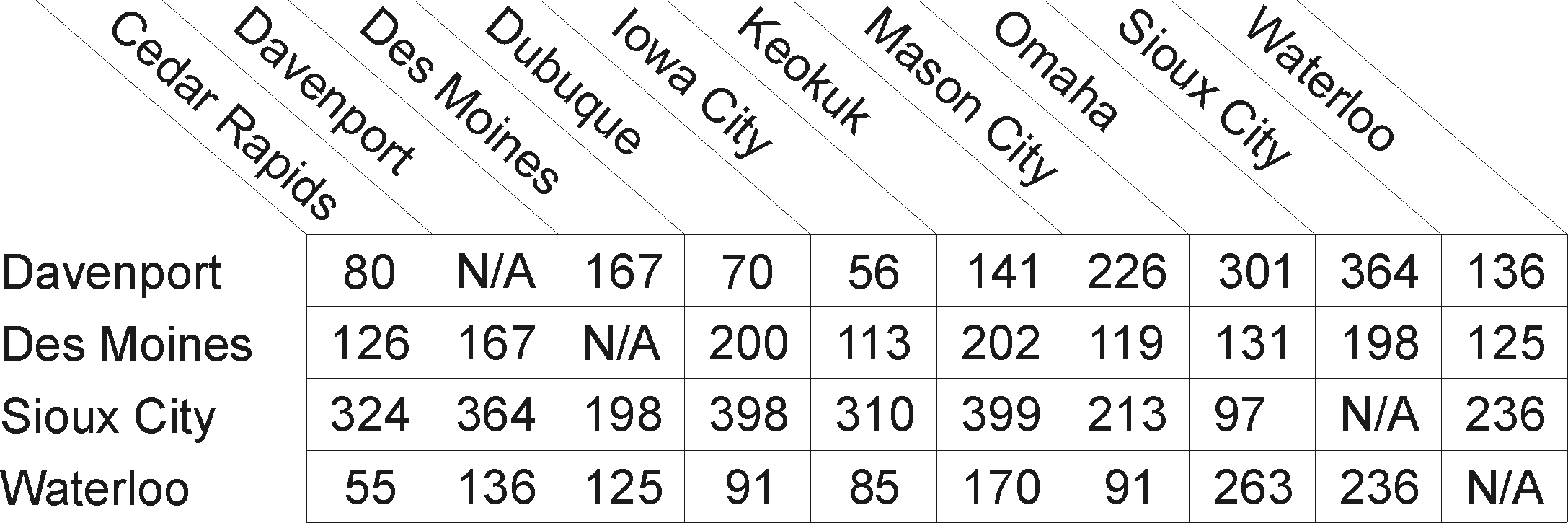
One nice use of a two-dimensional array is to represent the mileage distance matrix between cities you often see on maps. Figure 1 shows such a matrix for the state of Iowa:
In this lab, you will write a method that returns the distance between two cities, given their names.
Create a new class named IowaDistanceMatrix in the part4 package. The class should have a main method.
Next, you need to define the mileage matrix as an array containing an array and two String arrays that contain the names of the cities. Typing these in is tedious, so you can copy and paste the definitions from {Lab Installation Directory}/starters/lab08/arrays.txt and we've repeated them here:
static private int[][] matrix =

{
    { 80,  -1, 167,  70,  56, 141, 226, 301, 364, 136},
    {126, 167,  -1, 200, 113, 202, 119, 131, 198, 125},
    {324, 364, 198, 398, 310, 399, 213,  97,  -1, 236},
    { 55, 136, 125,  91,  85, 170,  91, 263, 236,  -1},
};

static private String[] rows =
               {"Davenport",
                 "Des Moines",
                 "Sioux City",
                 "Waterloo"
                };

static private String[] cols =
                {"Cedar Rapids",
                 "Davenport",
                 "Des Moines",
                 "Dubuque",
                 "Iowa City",
                 "Keokuk",
                 "Mason City",
                 "Omaha",
                 "Sioux City",
                 "Waterloo"
                };
Note that the matrix array defines an array of int[], and each subarray is of type int (a numeric literal with no decimal point is interpreted as int). Also note that we use -1 to represent the "N/A" value (distance from a city to itself).
Note that the rows and cols arrays are one-dimensional String arrays and contain the city names of the rows and columns in Figure 1.
Next, define a static method that will return the distance between two cities:
public static int distance(String city1, String city2)
{
    return 0;
}
Complete the method so that it uses the city1 String for a "row" city and "city2" as a "column" city and returns the distance between them. Here are some more specifications and hints:
In the main method, call the distance method, passing the names of two cities and print the result to the console.
In this part, you will compare how long it takes to traverse a List collection using an Iterator versus using the collection's get method.
Create a new class named MeasureTraversal in the part5 package. The new class should have a main method.
In main, begin by writing code to create a LinkedList collection and store 30000 String objects in it:
List<String> list = new LinkedList<String>();

for (int i=0; i<30000; i++)
    list.add("String" + i);
Next, mark the current system time:
long startTimeGet = System.currentTimeMillis();
Then write code to retrieve all of the Strings using each String's index to retrieve it:
for (int i=0; i<list.size(); i++)
{
    String s = (String)list.get(i);
}
Then retrieve the current time after the loop (i.e. the endTimeGet). Subtract the start time from end time and print the result to the console.
Repeat the timing and traversal code, but this time use an Iterator instead using a for loop and the get method:
Iterator iter = list.iterator();
while (iter.hasNext())
{
    String s = (String)iter.next();
}
Again, print the time difference to the console.
Run your program and write down the two times (they are in milliseconds). Which traversal technique is faster for a LinkedList?
Change the collection type from LinkedList to ArrayList and repeat the experiment. How do the numbers stack up? Why is the performance for get so slow on a LinkedList?
In this part, you will practice the techniques covered in this lab to reinforce the concepts.
Create a new class named PrintCommandLineArgs in the part6 package. The new class should have a main method.
Write code in main so that the program simply prints each of its command-line arguments to the console in the form:
arg[0]=xxxx
arg[1]=yyyy
Review Lab01 on how to configure command-line arguments in Eclipse, then run your program.