In this lab, you will work with inheritance and polymorphism.
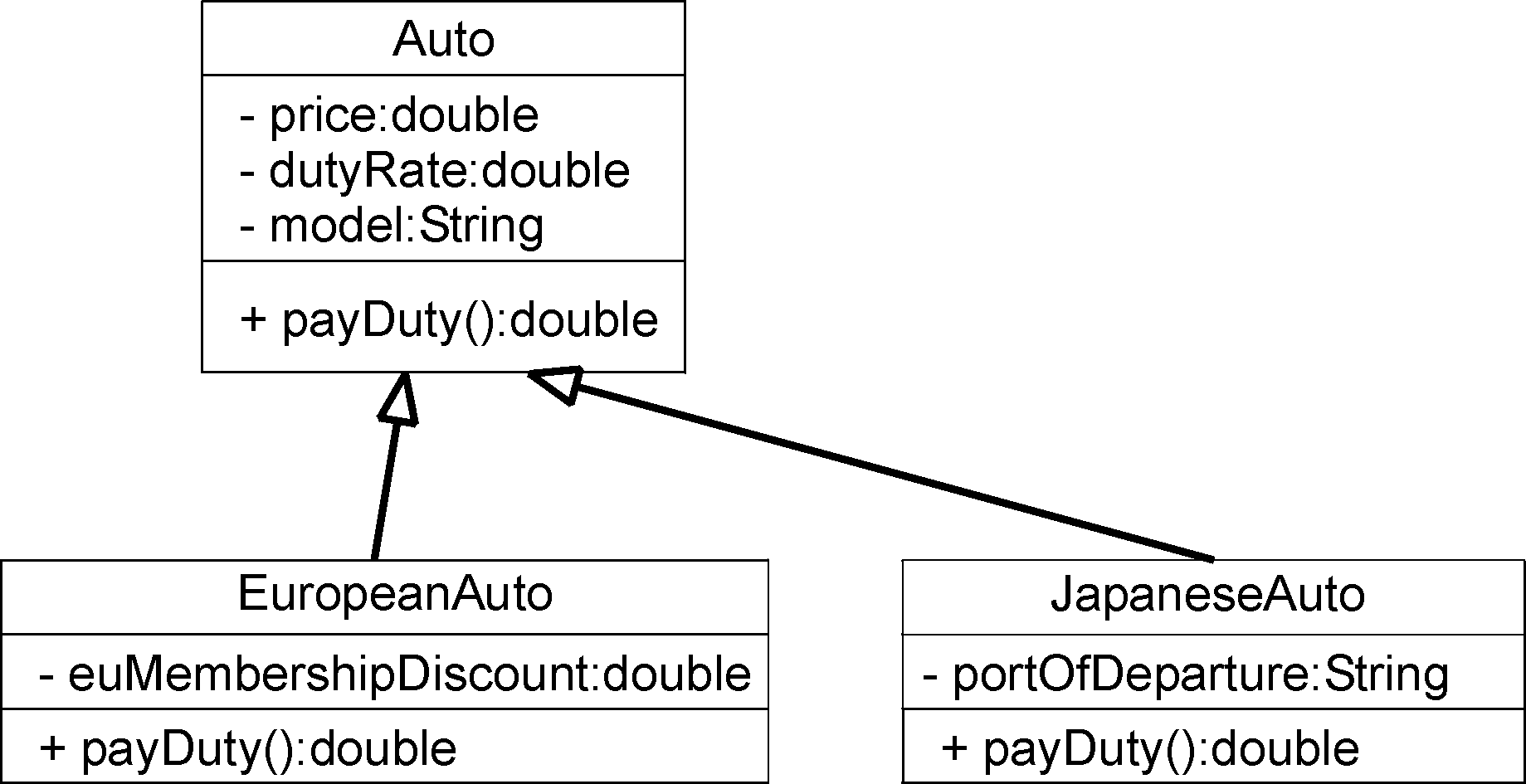
You will write three classes that implement a class hierarchy using inheritance. The application is for a business that purchases automobiles from domestic and foreign manufacturers. The business must pay a duty tax on each foreign car that is imported -- the duty calculation depends on the car's origin. Here is the UML class diagram for the system:
Here are the business rules:
Create a new Java project named Lab09.
Create a new class named Auto in the inventory package. The class does not need a main method.
Complete the class according to this specification:
Add the fields to the class as documented in the UML diagram. All fields should be private.
Use Eclipse to generate get/set methods for all of the fields.
Write a payDuty method as described in the UML diagram. The method should return the value zero.
Create a new class named EuropeanAuto in the inventory package that extends Auto. The class doesn't need a main method.
Hint: In the New Class wizard, you can choose the superclass by pressing the Browse button next to the superclass entry field and then start typing "Aut" into the search field.
Complete the class according to the following specifications:
Add the fields as specified in the UML diagram. All fields should be private, but your methods should be public.
Use Eclipse to generate get/set methods for the fields.
Write a public payDuty method as described in the UML diagram.
Implement this method using the business rule defined above. Note that to perform the duty calculation, you will need to call the getDutyRate and getPrice methods from the superclass:
double dutyRate = getDutyRate();
double price = getPrice();
Why can't the subclass access the fields directly?
Create a new class named JapaneseAuto in the inventory package. The class doesn't need a main method.
Complete the class according to the following specifications:
Add the fields as specified in the UML diagram. All fields should be private.
Use Eclipse to generate get/set methods for the fields.
Write a payDuty method as described in the UML diagram.
Implement this method using the business rule defined above. Note that you will need to call the getDutyRate and getPrice methods from the superclass.
For the portOfDeparture portion of the calculation, you can use the String class's equals method on the portOfDeparture field to determine if the JapaneseAuto was shipped from Yokohama or not:
boolean f = portOfDeparture.equals("Yokohama");
Create a new class named TestInventory in the test package. This class should have a main method.
Add code to main as described below.
Create objects for an Auto, an EuropeanAuto and a JapaneseAuto. Call the set methods to initialize their fields using the following data:
Object                Model  Price  Duty Rate
------                -----  -----  ---------

Auto object           Ford   20000    0%
EuropeanAuto object   BMW    35000    5%
JapaneseAuto object   Honda  30000    7%
The EuropeanAuto object should have an euMemberShipDiscount value of 2%.
The JapaneseAuto object was shipped from Yokohama.
Call the payDuty method on each object and print the result to the console.
Run and test your program to see if the duty calculations are correct.
In this part, you will create a collection of Autos and use polymorphism to simplify the task of calculating duty.
Create a new class named Inventory in the inventory package. This class should not have a main method.
Define a private field in the class of type ArrayList named inventory. Be sure to call new to initialize this field.
Define a method named addAuto that accepts an Auto reference and returns void. This method should simply add the reference to the inventory collection.
Define a public method named calcTotalDuty() that accepts no parameters and returns a double. Here are some hints on implementing this method:
Define a local variable named totalDuty of type double and initialize it to zero.
Set up a loop using an Iterator or the enhanced for loop to traverse all of the objects in the collection.
Inside of the loop, for each object retrieved, cast the reference to Auto and then call the payDuty method, adding the the returned duty to the totalDuty variable.
Return the totalDuty.
Edit the TestInventory class and do the following:
At the top of main, create an Inventory object.
After creating and initializing the Auto objects, call the Inventory object's addAuto method to add each of the Auto objects to the collection.
Call the Inventory object's calcTotalDuty method and print the result to the console.
Run and test your program. Is the total duty calculation correct?
In this part, you will add a new type of Auto to the application and demonstrate how polymorphism makes it easy to add function to a program without affecting existing code.
You will write a new class named AustralianCar that is a subclass of Auto. The duty calculation for these cars is simply the dutyRate times the price.
Define a new class named AustralianAuto that extends Auto in the inventory package. This class does not need a main method.
In the new class, write a payDuty method that implements the business rule described above.
Edit TestInventory, and in main, create an AustralianAuto and initialize its fields:
Object                Model  Price  Duty Rate
------                -----  -----  ---------

AustralianAuto object Holden 33000    8.5%
Add the AustralianAuto object to the Inventory collection.
Add code to print out the AustralianAuto's duty to the console.
Run and test your program. The key point here: What changes did you need to make to the total-duty calculation? The answer is: NONE! This is polymorphism in action -- polymorphism lets you add new subclasses without affecting existing algorithms. Look back at the calcTotalDuty method in the Inventory class and make sure you understand how this works.
In this part, you will investigate how constructors work in subclasses and superclasses.
Edit the Auto class and write a three-argument constructor that accepts parameters for all of the fields and assigns the parameter values to the fields.
Save the file and note the Problems View -- you should now have errors in the TestInventory class and in each of the subclasses.
The error in the TestInventory class should be expected -- that code explicitly used the built-in zero-argument constructor that no longer exists -- but what about the subclasses? (Remember that if you define no constructors, Java provides a built-in zero-argument constructor. If you write any other constructor, Java "takes back" the built-in one.)
The reason the subclasses have errors is that their built-in zero-argument constructors implicitly call the zero-argument constructor of the superclass -- since that zero-argument constructor no longer exists, the subclasses are in error.
Fix the TestInventory class's error by changing the Auto object's constructor to use the three-argument constructor. You can then comment-out the set methods for this object, as they are redundant.
To fix the subclasses, you will need to write an explicit constructor in each that explicitly calls the superclass's three-argument constructor. Follow these steps:
In the EuropeanAuto class, write a four-argument constructor that accepts parameters for all of the Auto fields as well as the euMembershipDiscount field. In the constructor, first call the superclass three-argument constructor, then assign the euMembershipDiscount field.
Then edit TestInventory and for the EuropeanAuto object, change it to use the new four-argument constructor and then comment-out the set methods.
Repeat the above step for the JapaneseAuto class, but the "extra" parameter is for the portOfDeparture rather than euMembershipDiscount.
Repeat the above step for the AustralianAuto class -- since this class contributes no new state, it needs only a three-argument constructor.
Run and test your program. You should see the same results as before.
In this part, you will investigate how a subclass method can invoke the implementation in a superclass.
Edit the Auto class and write a toString method that returns a String containing labeled values of all the object's fields.
In this method, do NOT invoke the superclass's (Object) implementation of toString. That means that the Auto class is replacing the implementation provided by the superclass.
Edit the EuropeanAuto class and write a toString method that returns a String containing the labeled values for not only fields contributed by EuropeanAuto, but also the fields from the Auto superclass. The code should look something like:
public String toString()
{
    String s = super.toString();
    s += "EU discount: " + euMembershipDiscount;
    return s;
}
Note that this method invokes the superclass behavior and then augments it. Compare this to the implementation in Auto that completely replaces the behavior from its superclass.
Repeat the above step for the JapaneseAuto class, augmenting the String with state contributed by the JapaneseAuto class.
Examine the AustralianAuto class -- since it contributes no additional state, you don't need to write a new toString method -- the implementation from the Auto superclass should be sufficient.
Edit TestInventory and add code that calls System.out.println on the Auto object reference and on the objects of each of the subclasses (you don't need to print the Inventory object).
Run and test your program -- do you see the augmented output?
If you're not happy with the way the output is formatted, edit the toString methods to fix it.
In this optional part, you will do some more work with inheritance.
Note: This part is quite time-consuming and challenging. Don't feel bad if you don't have time to completely finish it!
Your job is to implement a two-function calculator that supports addition, subtraction and, most importantly, an undo facility. The standard way to code an undo facility is to implement the Command design pattern. The following figure shows a UML diagram for how you will implement the system:
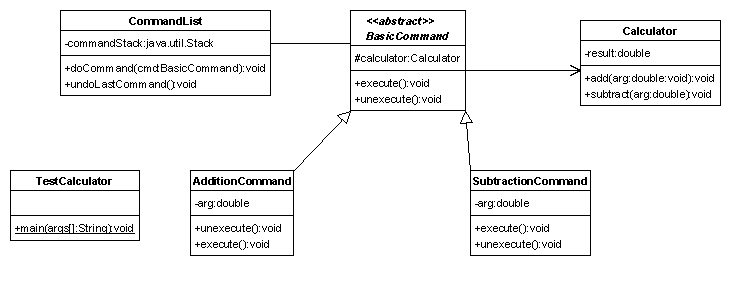
Here are a list of specifications for the program:
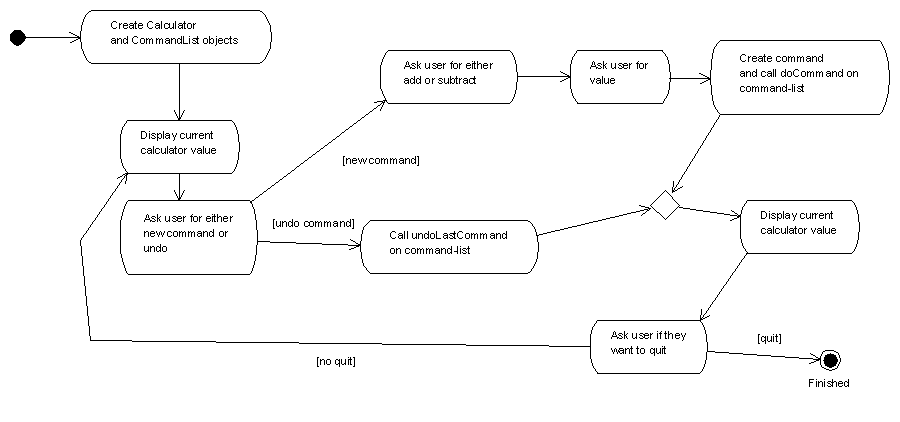
Create a package named part6, and in it, write the classes that implement the requirements described above.
Run and test. To test, try executing a couple of addition and subtraction commands, then un-doing them. Do the results make sense?